
Activate the Integration
Deactivate the Integration
Troubleshooting
Frequently Asked Questions
Activation
1. Click on Integrations under Support at the top of the page.
.jpeg?width=670&height=374&name=Ycharts%20Workflow%20-%20Step%200%20(6).jpeg)
2. Toggle on the Fidelity integration to activate.
.jpeg?width=670&height=374&name=Ycharts%20Workflow%20-%20Step%201%20(1).jpeg)
3. For the Client Header, we recommend using your Fidelity G-number or a unique firm-specific name, then select Submit.
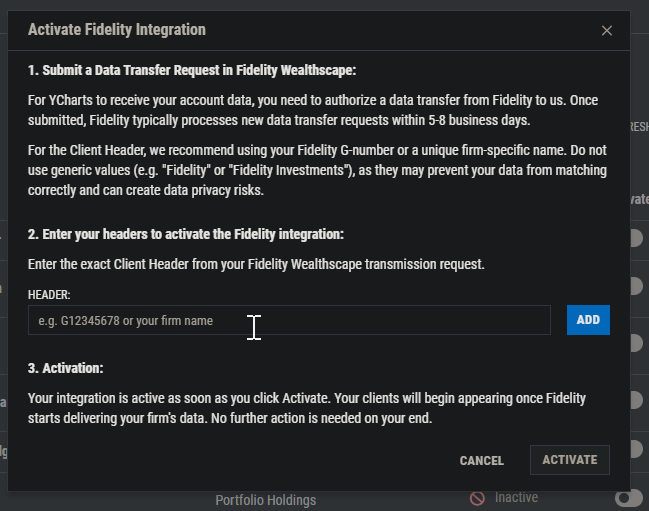
4. Submit a Data Transfer Request in Fidelity Wealthscape.
5. Once the transfer request has been submitted, it will take Fidelity 1-3 business days to send over the information to YCharts.
6. The integration will be marked as Active once it is fully set up and ready to use.
.jpeg?width=670&height=374&name=Ycharts%20Workflow%20-%20Step%200%20(5).jpeg)
Deactivation
Go to YCharts and open Integrations. Next to Fidelity, click Manage > Deactivate. Existing Fidelity data will remain in YCharts, but you will no longer be able to import additional portfolio data.
Note: YCharts does not store any login credentials or additional account information from Fidelity.
Troubleshooting
There are only a couple of errors you may encounter while using the integration. If you’re troubleshooting and need additional support, contact YCharts support team.
Error: Check that the integration is active
If you’re seeing this message, it is possible the integration was not properly activated, or there is an issue with the connection.
To resolve this issue:
- Navigate to Integrations within YCharts and check to see if the status is ‘Active.’ If the status is ‘Inactive’, click Manage > Activate, and follow the steps to setup the Fidelity integration.
Error: The selected item(s) do not have any holdings.
This error appears when you attempt to import entities that do not have holdings.
To resolve this issue:
- Try importing another type of entity.
- If you believe the holdings have not properly imported, reach out to YCharts support.
Frequently Asked Questions
How long does it take for the Fidelity integration to be fully activated?- It can take 5-8 business days from the initial request for the integration to be fully activated within your YCharts account.
Can I import cost basis data from Fidelity?
- No, cost basis information cannot be pulled over from Fidelity.
- No, by default any changes made in Fidelity will not transfer over to YCharts. You can change this setting your integration to automatically update here. You can choose from having holdings update daily, weekly, or monthly.
- A firm-level unique identifier (we recommend using your Fidelity G-number) that is used to ensure data is mapped properly from Wealthscape to YCharts. You'll enter the same Client Header in the activation pop-up within YCharts that you used on your Fidelity Wealthscape transmission request.
Related Articles
Request an Integration
Integration Proxy Mapping
Portfolios: Overview