
The Holdings Overlap tab allows you to compare the holdings of two securities side by side to identify shared exposure and fund overlap. You can toggle between Holdings and Underlying Holdings levels for a more granular view, and export the results to a PDF for a client-ready presentation.
Holdings Level
Exposure Comparison
Unique Holdings
Frequently Asked Questions
Holdings Level
The Holdings Overlap tab allows you to compare the holdings of two securities side by side, identifying shared exposure and unique positions at either the Holdings or Underlying Holdings level. Results can be exported to a PDF for a client-ready presentation.
Adding A Second Security: To compare holdings, select the pencil icon within the Holdings Overlap tab and search for the second security you'd like to add.
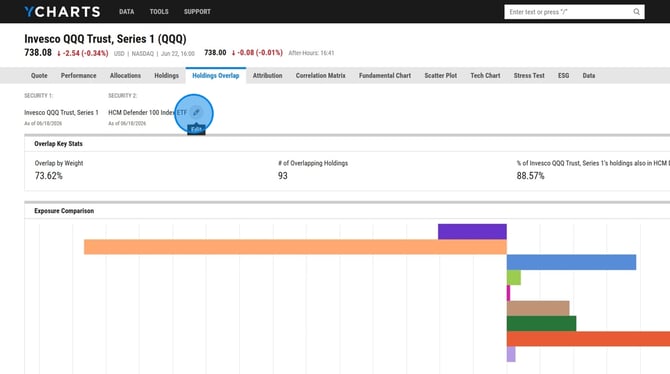
Holdings: This view displays the holdings exactly as they were entered for each security, along with a breakdown by holding type so you can compare the allocation makeup of each.
.jpeg?width=670&height=374&name=How%20to%20Export%20ETF%20Underlying%20Holdings%20-%20Step%207%20(1).jpeg)
Underlying Holdings: This view drills down into the individual stocks and bonds held within each security, giving you a more granular look at where the two funds overlap at the position level.
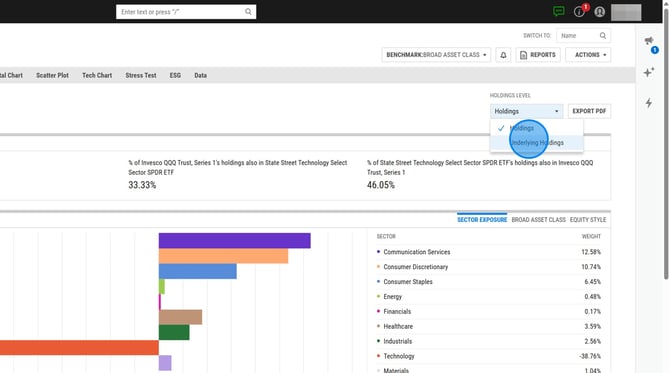
Exposure Comparison
This view displays a side-by-side table of the unique holdings for each security, sorted by weight, allowing you to quickly see which positions are exclusive to each fund and how significantly they contribute to each security's overall allocation.
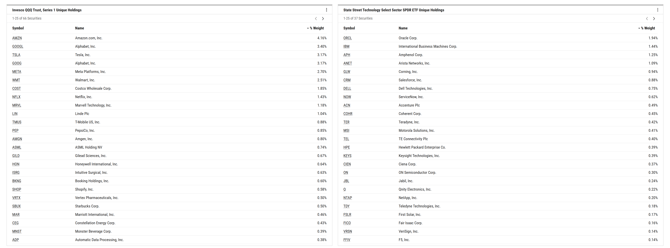
Unique Holdings
This view shows the top holdings for each security in both a pie chart and a ranked table, making it easy to compare the largest positions across the two funds at a glance. Holdings are sorted by percentage weight for each security.
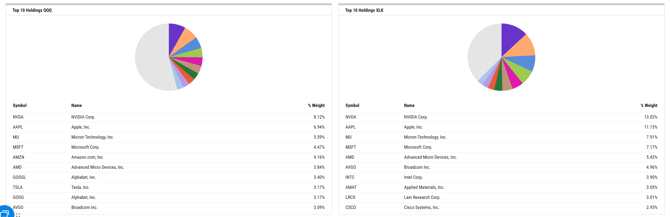
Frequently Asked Questions
Can I pull these modules into a report template?
- Yes, you will be able to pull in the Overlap Key Stats, Exposure Comparison, Common and Unique Holdings into a custom PDF report via our Report Builder tool.
Why is holdings data not loading for some securities?
- Holdings overlap data is based on the data listed on the All Holdings tab of the security. For certain securities, like SMAs, complete holdings information may not be available, so overlap data cannot be displayed.
Can I pull in historical holdings data?
- Not at this time, we will only be able to view the current holdings.