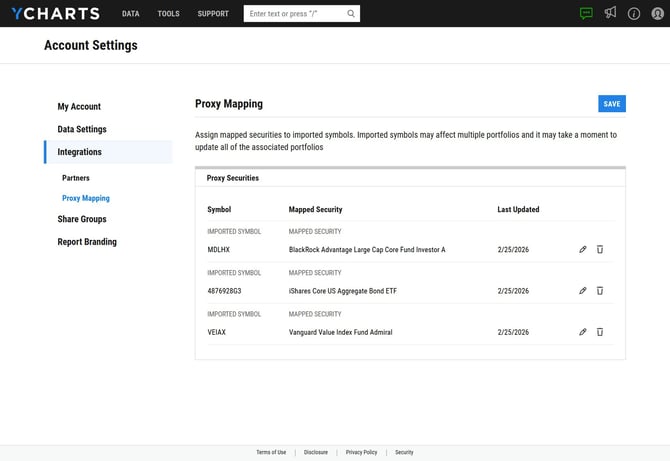
The Integrations Proxy Mapping allows you to easily view, edit, or remove proxy securities that are mapped to holdings from an integration.
Edit: This will allow you to update the proxy to a different security. Any imported securities moving forward will map to this new proxy security. This updated proxy will only apply to portfolios created after the change, any existing portfolios will not automatically update with the new proxy.
Delete: This will remove the mapping completely. The next time you import the security, you will be prompted with the option to add a mapping as if it was the first time.
How to Access Proxy Mappings:
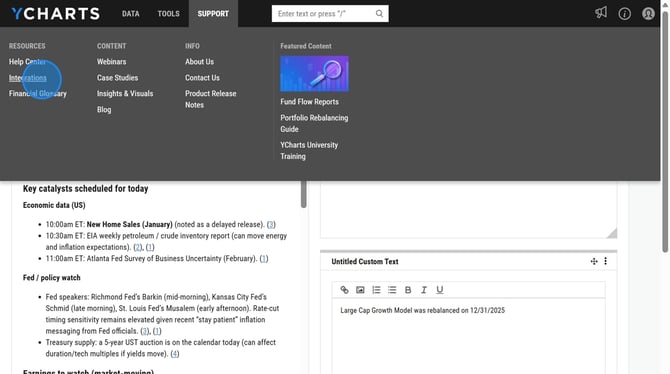
1. In the Support dropdown menu at the top of the page, select Integrations.
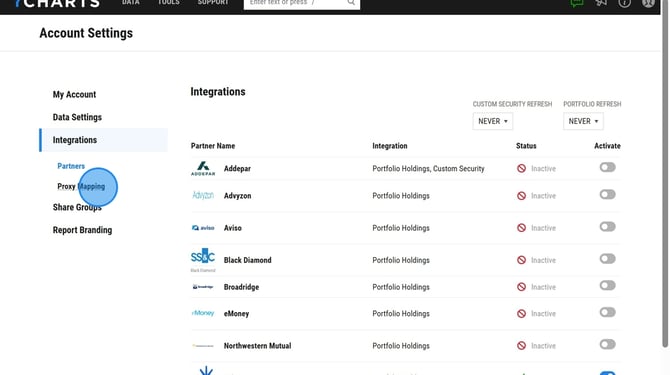
2. Select Proxy Mapping
3. On this page you'll be able to make edits by selecting the pencil icon or delete mappings by selecting the trash can icon. After making any changes, you will want to select the blue Save button.