
If you are trying to retrieve mutual fund data and are receiving and ERR: INVALID COMPANY error within your spreadsheet, this is most likely due to the ticker symbol not being entered correctly.
How to Fix
Frequently Asked Questions
How to Fix
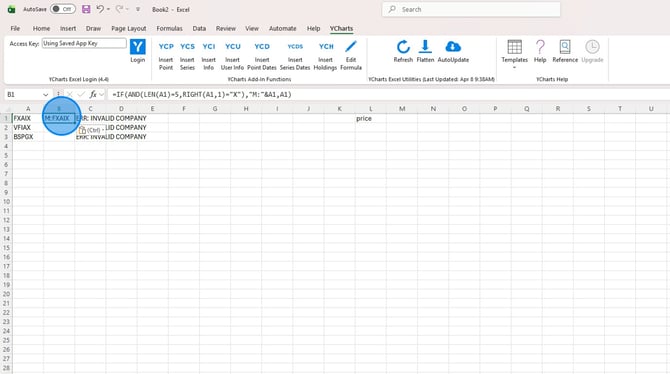
For mutual funds that have a 5 character ticker symbol, you can enter the formula into excel to add a M: in front of all affected funds. This formula will assume that A1 is the ticker symbol.
=IF(AND(LEN(A1)=5,RIGHT(A1,1)="X"),"M:"&A1,A1)
1. Enter in mutual fund formula into blank cell
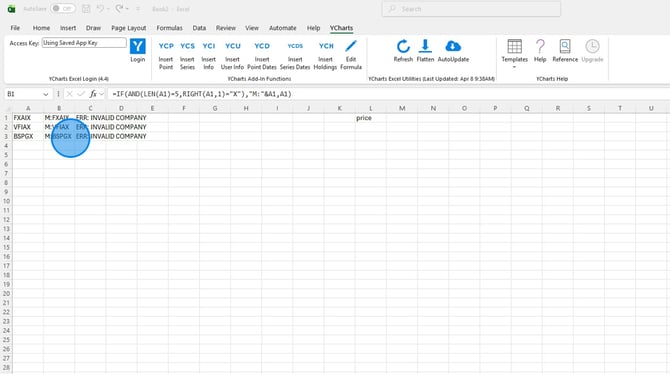
2. Drag mutual fund formula down for all securities
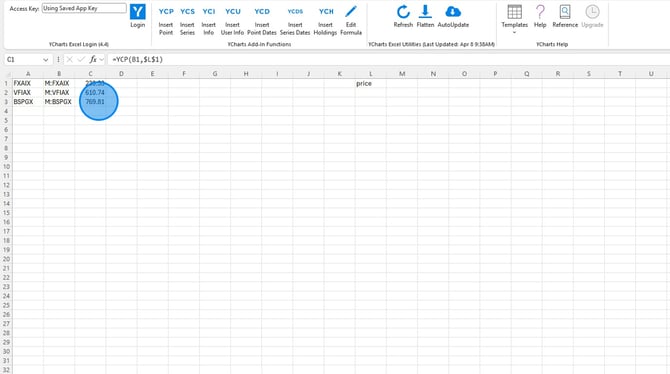
3. Update any other formulas to reference the new row.
Frequently Asked Questions
I entered that formula, but the security still isn't recognized, what else could be wrong?
- Double check to see if any funds are Canadian funds, if so you will need to add a .TO after the ticker symbol. For example, M:FID5982.TO.
I have a mutual fund that has more than five characters, is there a different formula I can use?
- We do not currently have a formula that will add the M: to tickers longer than 5 characters, you will need to add this manually.