Skip to content
English - United States
  • There are no suggestions because the search field is empty.

How Do I Screen for Brokerage Approved Funds?

Within the Fund Screener, you can exclusively access funds that have received approval from your brokerage dealer.

To view this data, follow the steps below.

1. Select Modify.
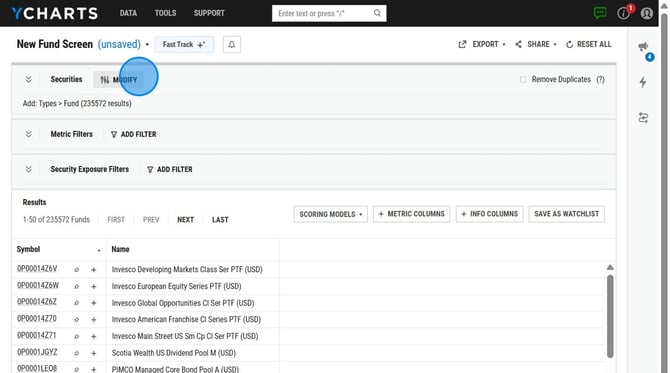
How to Filter Funds by LPL Brokerage Availability on YCharts - Step 1


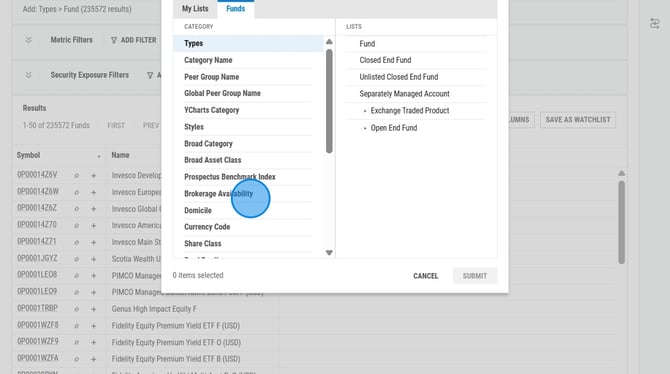
2. Click Brokerage Availability.

How to Filter Funds by LPL Brokerage Availability on YCharts - Step 2


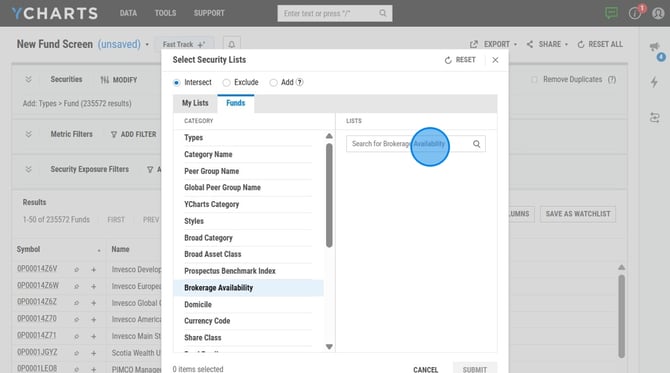
3. Search for brokerage.

How to Filter Funds by LPL Brokerage Availability on YCharts - Step 3


Frequently Asked Questions

How often are these brokerage lists updated? 

  • There is not a set frequency for how often these are updated, it will be different for each brokerage. 


Related Articles

Fund Screener: Overview

Add, Intersect, and Exclude in Screeners

How to Screen for Funds with a Specific Stock