
The YCH Function within our Excel Add-In allows you to pull in the top 25 holdings from any fund or portfolio. Below is a quick walkthrough video that goes over this function as well as how to successfully pull in holdings data.
Getting Started
Function Arguments
Frequently Asked Questions
Getting Started
How to Use the YCH Function
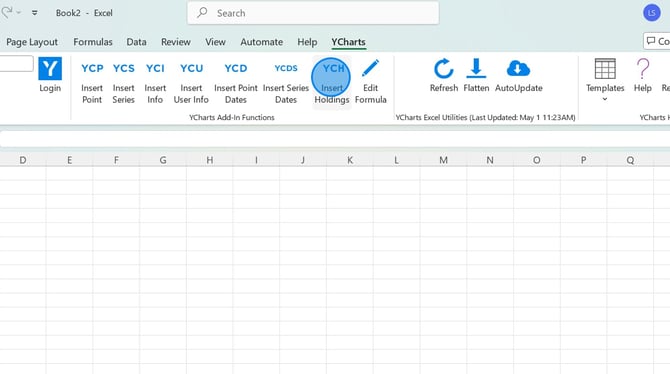
1. Open the YCharts tab in Excel and select the YCH function box.
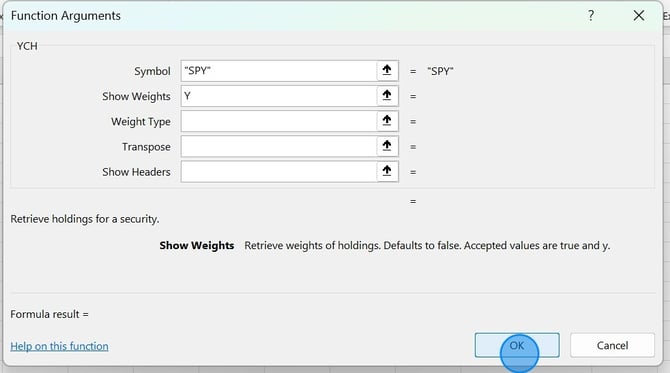
2. Add in the ticker symbol and any other applicable fields. Then select OK.
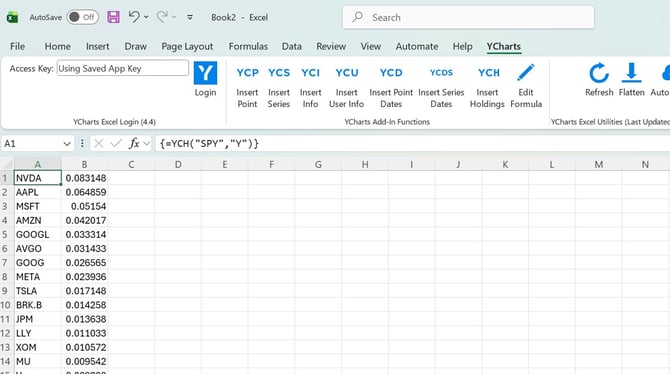
3. The data should now flow through into the spreadsheet.
Function Arguments
Ticker: The ticker symbol of the security (required)
Show Weights: Allows for holding weights to be shown, add a "Y"
Weight Type: Only available for portfolios, allows you to choose between which weight type to pull in. Add "current" or "target".
Transpose: Moves the data from column to row, add a "Y"
Fill Null: What to display if a null value is retrieved. Learn more here.
Frequently Asked Questions
Can I share my excel file with colleagues?
- Excel files can be shared with colleagues as long as they also have an active YCharts account as well as have the YCharts Excel Add-In downloaded on their computer.
Can I pull in more than the top 25 holdings?
- No, at this time we are limited to 25 holdings. To pull in the full list of holdings, you will need to export this data from the security's holdings tab.
How do I make edits to the YCH formula?
- To make edits, you'll want to click on the cell with the formula then select Edit Formula in the YCharts ribbon at the top of the page.